Test One Melody Before Building an AI Music Demo
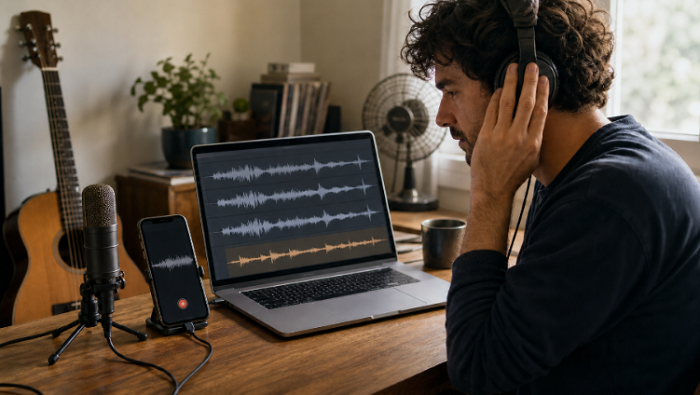
A polished sample can make any music tool sound convincing. A rough idea recorded in a bedroom, rehearsal space, or moving car is a harder test. Before a creator builds a full arrangement around a voice to instrument workflow, it is worth asking a narrower question: does the same melody remain recognizable when the recording conditions change?
VoiceToInstrument gives that question a practical shape. The browser tool lets you upload or record a vocal idea, choose an instrument, and generate a converted track. The conversion panel caps files at 50MB and shows a cost of five credits per run. Check a phone recording before the session starts: M4A, a common voice-memo format, is not among the listed upload options, so it may need to be exported as WAV or MP3 first.
Three Recordings Expose More Than One Clean Demo
Use one eight-bar melody and record it three ways. Keep the notes and tempo as close as possible. Change only the capture condition. The goal is not to prove that one microphone is better. It is to see whether the converter still understands the musical idea after real-world noise, distance, and performance variation enter the file.
Clean Take Establishes the Conversion Baseline
Start in the quietest room available. Put the phone or microphone at a steady distance, sing a simple melody without lyrics, and leave a short silence at the beginning and end. Avoid reverb, backing music, and doubled vocals. This becomes the control file. If the converted part changes the basic contour here, there is little value in testing messier takes yet.
Choose an instrument with an obvious attack, such as piano or plucked guitar. Clear note starts make timing mistakes easier to hear. Generate the track, then play the original and conversion back to back. Do not judge realism first. Check whether the phrase rises, falls, pauses, and resolves in the same places.
Phone Memo Tests Real Capture Conditions
Record the same phrase as a normal voice memo, with the phone at roughly arm’s length. Use one take and leave the breaths, level changes, and room sound alone. If the file arrives as M4A, export a WAV or MP3 copy without normalizing it. Then upload that copy. VoiceToInstrument is meant to map pitch, timing, and expression into another timbre; this version shows whether the musical idea survives before anyone cleans the recording.
Background Noise Reveals Fragile Pitch Tracking
For the third file, add one controlled problem. A fan, light room chatter, or a small amount of street noise is enough. Do not bury the voice. The point is to create a plausible bad capture, not sabotage the test.
Listen for notes that jump upward, attacks that arrive early, and sustained tones that wobble. A noisy file may still create an attractive sound while misunderstanding the melody. That distinction matters. A pleasant accident can inspire a new part, but it should not be mistaken for reliable conversion.
Compare Pitch Timing and Dynamics Side by Side
Put the three results in a simple scorecard. The categories should describe things a musician can hear, not vague labels such as “quality” or “power.” A useful comparison separates preservation from polish.
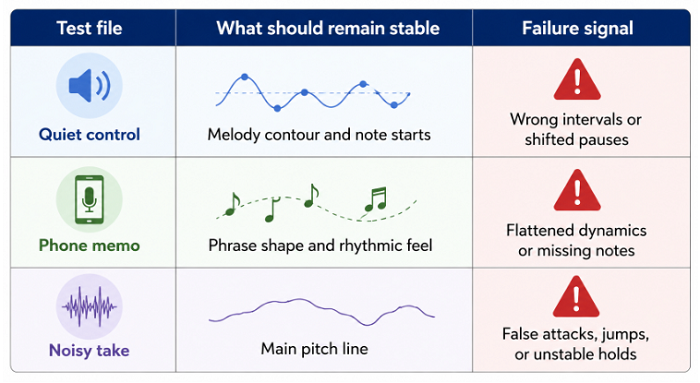
Score each row as usable, repairable, or misleading. “Usable” means the part can enter a demo without correcting the musical idea. “Repairable” means a cleaner source or a simpler performance would probably help. “Misleading” means the output sounds finished enough to hide that it changed the notes.
Same Melody Must Stay the Control Variable
Do not sing three different phrases and compare the prettiest result. That tests composition, performance, and conversion at the same time. Keep the melody fixed, use the same target instrument, and avoid changing several settings between runs. If the first take uses piano, keep piano for all three. Save guitar or violin experiments for a second round.
If the starting point is a written description rather than a sung phrase, use an AI music generator and keep that result out of this comparison. Text-to-song tools may invent the melody and arrangement. Vocal conversion is useful here precisely because the melody stays fixed. Put both outputs in one scorecard and there is no longer a clean variable to judge.
Listen for Musical Errors Not Gloss
A convincing instrument tone can distract from a wrong rhythm. Listen once on small speakers, then once on headphones. Tap the beat against both the vocal and converted file. Hum the original phrase over the result. These plain checks catch timing drift faster than staring at a waveform.
Dynamics deserve the same attention. If the vocal leans into the last note, does the conversion also feel stronger there, or does every note arrive at one level? Pitch and timing tell you whether the phrase survived. The change in emphasis tells you whether the converted part still behaves like the performance, rather than a neat row of equal notes.

Route the Winning Take Into the Studio
The comparison is useful only if it changes the next decision. Pick the file with the most accurate musical structure, not automatically the cleanest surface. Sometimes the phone memo will carry a better rhythmic push than the careful take. Sometimes the control file will win because the other recordings create false note attacks.
Convert First Then Build Around the Result
Once a take passes, open the generated result in the full Studio and treat it as one track in a larger draft. Finished conversions open there, while multitrack access is included with paid plans. Keep the original vocal beside the converted part during the first arrangement pass. That reference makes it easier to hear when later layers pull the song away from the initial phrase.
Add only one supporting element at first: a bass movement, a simple beat, or a held chord. If the converted melody still reads clearly, the part is doing its job. If it disappears as soon as another track enters, changing the target instrument or register may help more than adding processing.
Stop When the Source Needs Repair
Repeated conversion is not always the answer. If all three files miss the same note, check the sung pitch. If only the noisy take fails, capture the idea again in a quieter place. If every target instrument turns one fast passage into a blur, simplify that passage and test it alone.
Each conversion uses five credits, so another guess is still another billable run. Give the same source two attempts at most. If both miss in the same place, change the recording rather than hunting through instrument names. The converter receives a performance; it cannot know which uncertain note the songwriter meant to sing.
Verdict: Use Conversion as an Arrangement Check
VoiceToInstrument makes the most sense when the melody already exists and the open question is instrumental color. The three-file test gives a songwriter a quick answer without pretending the converted track is already a finished record.
If the tune is still undefined, write it first. If the rough vocal cannot hold pitch or time, record it again. Keep the original beside the conversion and use the result for one decision: does this melody deserve that instrumental role in the demo?