AI Music Video Generator: Turn Your Favorite People into a Personal Rap Duo
Some messages deserve more than a few words in a group chat. A best friend's birthday, a long-distance anniversary or a family reunion can be the starting point for something playful: two familiar faces sharing a microphone in a short rap performance. The appeal is recognition. You know the people, you understand the joke, and the scene gives an everyday memory a different kind of energy.
Music With Me approaches the AI Music Video Generator idea through this personal lens. Its homepage centers on photo-based, two-person rap videos, with a workflow built around choosing your duo, selecting a stage and adding a message. For anyone who enjoys music as a way to connect, that is an inviting creative brief: start with people who matter, then give their story a beat.
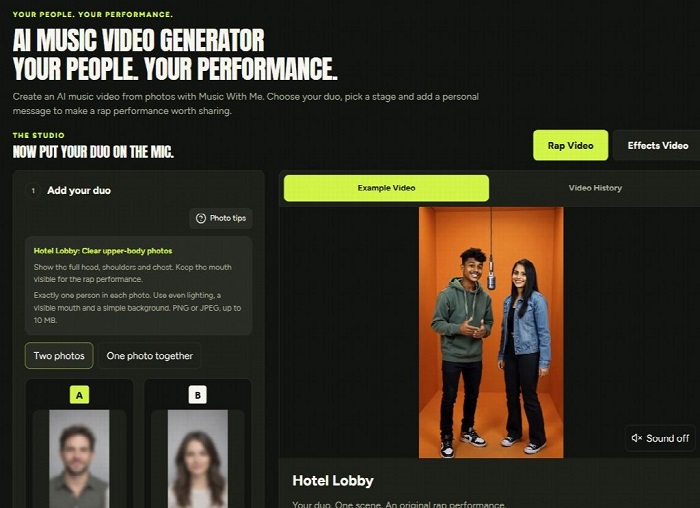
Music With Me's homepage and creation studio, showing the duo photo workflow alongside an example performance.
Start with the relationship, then choose the scene
A useful first question is not which effect looks the biggest. It is who the video is for. Two siblings have a different shared history from two colleagues. A birthday surprise calls for a different tone from an anniversary greeting. When the relationship is clear, decisions about the scene and message become easier.
Imagine a friend who always arrives early for your Sunday coffee stop. That small habit can give a birthday clip more personality than a broad instruction to make something exciting. Or picture a couple who met near the waterfront: a sunset setting can connect the visual idea to a memory they already share. The scene supplies atmosphere; the personal detail gives it meaning.
How Music With Me builds a photo-based performance
The homepage presents a Rap Video studio with a sequence of practical choices. You can upload two separate portraits or choose the option for one photo together. Separate portraits are useful when your favorite picture of each person comes from a different day or place. The aim is to bring both people into one shared scene.
The photo guidance is specific: keep faces well lit, show the mouth clearly and avoid distracting backgrounds. For the selected Hotel Lobby option, the interface asks for clear upper-body photos that include the head, shoulders and chest. With separate uploads, each image should contain one person. Following those instructions gives the system clearer source material to work with.
Next comes the stage. The interface includes settings such as Studio Booth, Street Cypher, Birthday Party, Office After Hours and Golden Hour Pier, alongside other looks. Watch the example for the scene that interests you. A preview helps you judge whether its mood suits a warm greeting, a friendly joke or a more energetic double act.
The workflow also includes a scene-image step before video creation. This gives you a chance to inspect the faces, setting and overall style before committing to the performance. Treat that review as part of the creative process. If the image does not communicate the idea you had in mind, adjust your inputs before moving forward.
Write a message that sounds like your people
Personalization works best when it is focused. Music With Me offers occasion prompts such as Birthday, Best Friends, Couple and My Business, with room to add your own detail. A short direction can establish the recipient, the occasion and the emotional tone without trying to squeeze a whole biography into a brief clip.
For a birthday, you might write: “Celebrate Maya's birthday with a cheerful rap about our weekend road trips and her unbeatable playlist.” For a long-distance friendship, try a warm thank-you built around a shared routine. For a team clip, name the business and describe what the two people do in straightforward language.
These are creative directions, not guaranteed scripts. The website explains that the message guides the performance and that exact lyrics are not guaranteed. Music, vocals and lip sync depend on the selected model and settings. Keep the main idea simple enough to survive a different wording, and review the finished audio before sharing it.
Give each occasion its own creative treatment
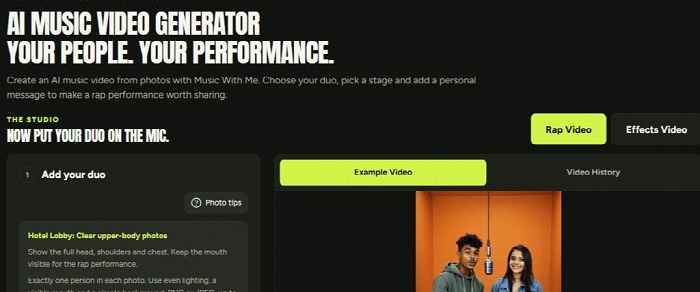
Real website screenshot: four example duos illustrate different moods and personal connections.
A birthday double act. Put the birthday person beside someone they know well. Choose a celebratory setting and include a hobby, favorite snack or shared memory. A small, affectionate detail can make the greeting feel made for them, especially when the humor is something they would enjoy too.
A friendship across distance. Two people do not need to be in the same room for their portraits to become the starting point. Use a familiar memory as the theme: a concert, a holiday or the everyday catch-up you miss. The finished clip can be a lighthearted way to reopen a conversation.
A family reunion moment. A sibling pair or a duo across generations can make an unexpected performance. Choose a family saying or a happy recollection that the intended audience will recognize. Keep it welcoming so everyone involved feels included in the joke.
A playful team introduction. Two teammates can use the format to bring some personality to an informal introduction. Keep the message clear and the concept relevant to the business. If you plan to use the result publicly or commercially, check the applicable usage terms and get permission from the people pictured.
Choose the format for the way you will share
Before generating, decide where the video is likely to be watched. The studio displays portrait, landscape and square formats, along with quality and duration choices. Availability and the credit quote should be checked in the live interface. A vertical composition may suit phone viewing, while a wider frame may work better inside a presentation or a landscape layout.
Review both faces in the chosen composition. A scene that feels balanced in a wide preview may need a different approach in a narrow frame. After generation, watch the entire clip, listen to the audio and check whether the personal message comes across. Download the version you actually want to send rather than judging the result from a still image alone.
Keep the first attempt focused
For a first project, choose two clear photos, one scene and one personal detail. Review the scene image, confirm the available settings and read the credit quote before creating the video. The site offers different purchase options, so check the current plan or credit-pack details instead of assuming every generation has the same cost.
Use photos you have permission to upload, and be thoughtful about where the result will travel. A joke that belongs in a private group chat may not belong on a public profile. That choice is part of making a personal video well: the audience matters as much as the people on screen.
Music With Me's appeal is the chance to turn a recognizable relationship into a small performance. You bring the faces and the memory; the studio gives you choices for staging the moment. Start with someone who will understand the reference, keep the idea clear, and make a clip that feels worth sending to them.
For another rap-video resource to explore, visit https://rapsong.io/.